money heist
The fifth season of the famous series La casa de papel has just premiered on Netflix this Friday, September 3, 2021. The messaging service WhatsApp has not wanted to miss this opportunity to celebrate the arrival of the new chapters of the Spanish saga, so which has launched a pack of stickers.
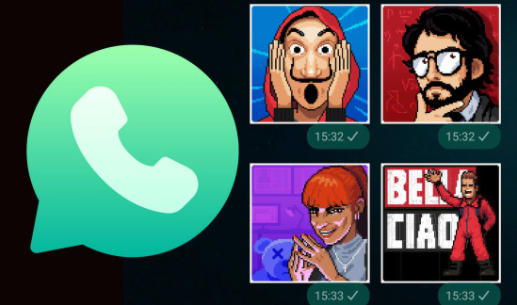
This new WhatsApp sticker pack is called Sticker Heist and as we can see in the screenshot shown by the WABetaInfo portal, there are stickers of The Professor, Lieutenant Sierra, Nairobi, and more.
This pack is available for all countries and contains a total of 17 different stickers inspired by characters in La casa de papel 5.
The new sticker pack Sticker Heist is downloaded in the same way as the other stickers that we find in WhatsApp, you just have to follow these steps:
As you can see, it is 658 KB in size, so it does not take up much space on the mobile. It should be said that all the stickers are animated and represent phrases or scenes of the characters.
If for some reason you deleted a WhatsApp conversation with very important photos and videos, then you have to know that there is a very simple trick that will allow you to recover them. Next, we are going to show you how.
The secret trick, which few people know about, only works if the WhatsApp user made a backup of the instant messaging application. If you meet this requirement, feel free to review this video for more details.
WhatsApp, one of the most popular instant messaging applications, has a series of tools designed to facilitate the exchange of messages with our friends and family. Among so many recent updates like, for example, the speed of the audios, the messages that self-destruct, the expiration period of seven days for some chats, the statuses, you may have forgotten the basics.
Functions like the WhatsApp seen are so iconic, that there are times when we overlook that this tool can also be configured to our personal taste. That is if for any reason you want to prevent your acquaintances from knowing when you entered the application and if you read their messages, WhatsApp gives us the possibility to choose whether to keep the reading confirmation of our messages or deactivate it completely. If this interests you, keep reading.
Many users use WhatsApp every day to communicate with friends and co-workers. That is why many of them have two accounts; however, they do not know how to have both sessions open simultaneously and on the same PC. If you have this problem, we will show you how this simple trick works.
Unlike what happens on a mobile phone – where we are limited to opening a single account – on a computer it is possible to access two accounts simultaneously if we use a trick, although applying it requires a series of steps.
If you are tired of belonging to a WhatsApp group, but you are ashamed to leave it, you should know that there is a secret trick with which you can say goodbye to that annoying group chat and no one will notice that you left.
If you are eager to know this fantastic WhatsApp trick, which few people know, all you have to do is follow the steps shown in the following video that soon became a trend on social networks.
Creating a completely different series based on a universe that knows half the world can't… Read More
The strikes of scriptwriters and actors have put in check the constant flow of content to… Read More
Money Heist has returned to Netflix. This time as a prequel to the original series… Read More
One of the 50 best war films in cinema history turns 25 years old. And it is not… Read More
What is the singapore kiss In short, it is about emulating during intercourse, through the… Read More
Regarding patents, Sony is one of the technology companies that has carried out the most registrations in… Read More

